In Archicad, it's possible to quickly identify and remove duplicate elements using the Check for Duplicates command, keeping your project clean and well organised.
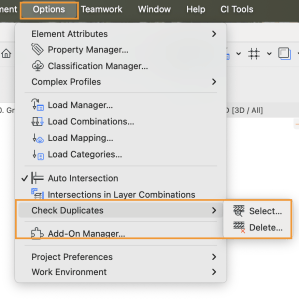
Do automatically identify duplicate elements, select Options > Check Duplicates:
JavaScript is disabled in your browser.
Please enable JavaScript to experience the full functionality of our website.
This website requires a more up-to-date browser.
Your online security & browsing experience on this website may be affected by not having an updated browser. Upgrade your browser: Mozilla Firefox, Google Chrome, Microsoft Edge, or Apple Safari
AEC Tip of the Day
In Archicad, it's possible to quickly identify and remove duplicate elements using the Check for Duplicates command, keeping your project clean and well organised.
Do automatically identify duplicate elements, select Options > Check Duplicates:

The best solution is the one tailored to your needs. Complete the form and our friendly team will be in touch.