How Ignite Engineering uses #Task to automate repetitive SOLIDWORKS work, protect engineering time and deliver increasingly complex projects at scale.
“Every single drawing that leaves Ignite has had #Task used on it”
— Scott Cox, Director, Ignite Engineering
When Ignite Engineering takes on a project, it is rarely routine. The Australian mechanical and structural design consultancy specialises in unique engineering problems - often filling critical methodology gaps in major projects with custom temporary structures and purpose-built equipment.
Founded by Scott Cox just over seven years ago, Ignite has grown from one engineer to a team of around 15. Its portfolio includes work associated with Cross River Rail, North East Link, Western Harbour Tunnel and Bridgewater Bridge, alongside flood protection systems, tunnel ventilation supports, marine equipment, wastewater infrastructure and custom lifting solutions.
Around 80 per cent of Ignite’s work is design, typically taking a project from concept through detailed design and shop drawings. Most jobs begin from a blank page which makes engineering judgement central to the value Ignite provides. The design cycle also creates large volumes of repetitive drawing and file administration. #Task has been part of Ignite’s answer almost since day one.
Complex and unique by design
Ignite prefers to work at the difficult end of engineering consultancy. Ignite is usually brought in when a construction methodology has a gap, a contractor needs a one-off solution, or a project requires equipment that does not yet exist. The result may be temporary—many structures are built, used and removed within the life of a project—but the engineering still needs to be safe, efficient, detailed and buildable.
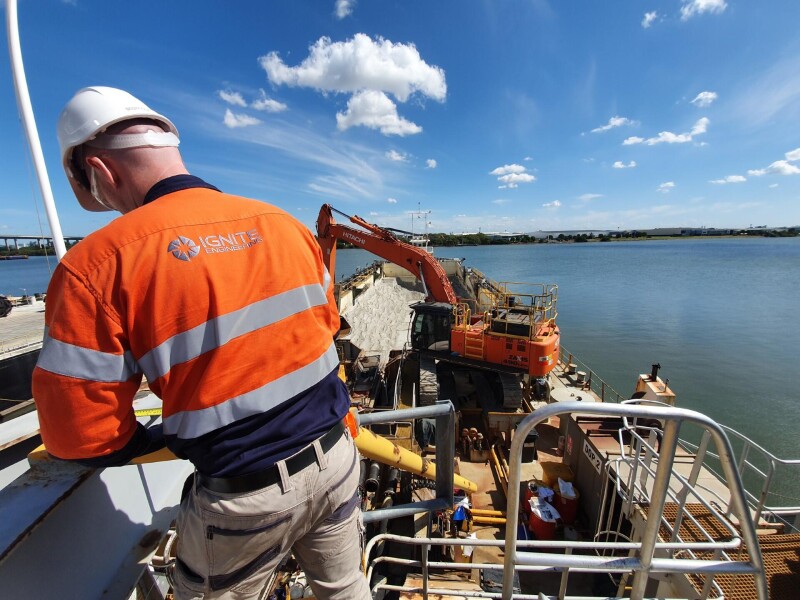
One recent example was a large, complex flood-barrier system for Brisbane’s Cross River Rail. Other projects have ranged from ramps carrying heavy construction vehicles into major tunnels, to systems for moving large escalators through constrained access points, to specialist lifting and handling equipment.
“Our Vision is to be Australia’s leading engineering consultancy for the those who have the complex and unique challenges that our team are inspired to solve..”
That focus means Ignite rarely repeats the same design. “Every job is different,” Scott says. The engineering work demands creativity; the surrounding document preparation work demands speed, accuracy and repeatability.
Automation from the beginning
Before founding Ignite, Scott had experienced the manual alternative. Updating drawing revisions, generating PDFs and creating cut files across a large set meant opening files one by one and repeating the same actions for hours. He briefly considered teaching himself to build the necessary macros, then decided there had to be a ready-made solution.
An online search led him to #Task, which was then available as a free tool. It could run repetitive operations rapidly across multiple files while he watched the work happen automatically. For a new consultancy trying to maximise the value of every engineering hour, the decision was straightforward.
“We picked up #Task at an early stage of the business, and as we’ve grown it has become essential to the workflows we use.”
What began as a founder’s productivity tool grew alongside the business. Ignite’s relationship with #Task now spans nearly seven years, from the product’s earlier free version through to its current commercial phase as a solution developed and provided by Central Innovation.
What #Task automates at Ignite
Ignite uses #Task primarily in its SOLIDWORKS drawing workflow. Scott estimates that about 90 per cent of the team’s use is drawing-related, with the balance supporting model-side tasks. The most common workflows include:
- managing custom properties across drawing sets;
- updating revision tables and drawing-level properties;
- controlling layers, client drawing borders and issue stamps;
- creating PDFs in batches;
- exporting flat patterns; and
- assigning materials across relevant model files.
The value is not simply that each action can be automated. #Task gives the team a consistent interface for selecting files, configuring a sequence of macros and processing the work as a batch. Instead of relying on disconnected scripts or repeating a command hundreds of times, engineers can start the job and move their attention elsewhere.
“In its essence, #Task is a system to automate repetitive tasks and allow your people to work on something else while that’s happening.”
The economics of a 500-plus-drawing project
The benefit becomes most visible when the drawing count rises. Ignite’s Cross River Rail flood-barrier project ran over roughly two years and produced more than 500 drawings, including associated components and accessories. Versions of the set were issued around five times. Each issue required drawing data, revision information, client borders and approximately 15 custom properties to be managed consistently across the package.
Doing that file by file would have created an enormous administrative burden. Scott is comfortable estimating that #Task saved hundreds of hours on that project alone. He also estimates that automating drawing data and revision management can remove roughly 10 to 20 per cent of drafting time on drawing-heavy work, depending on the number of files and issue cycles involved.
“We’re working on hundreds of drawings, we couldn’t economically do the job without using #Task at that scale.”
That is not just a productivity gain; it changes resourcing and competitiveness. Ignite delivers detailed shop drawings in a market where this work is frequently outsourced. Automation helps the consultancy keep more of that capability close to the engineering team, maintain its drawing quality and respond quickly without adding unnecessary drafting capacity.
“We would have to have more drafters to do the same job if we weren’t using it. You couldn’t be as competitive, and you couldn’t punch out drawings as quickly.”
A simple tool that becomes second nature
New team members generally arrive without prior experience of #Task. Ignite introduces them to the small set of tools and standard sequences used most often, then builds from there. Scott describes the onboarding process as smooth: the simpler tools are quick to learn, the interface is consistent and regular use soon becomes second nature.
For Ignite, this matters because the product does not sit with one automation specialist. It is used by the people producing and managing the drawings. A common interface makes repeatable automation accessible across the team and turns good practice into part of the everyday workflow.
A product relationship that has grown with the business
Ignite did not adopt #Task as part of a one-off transformation project. The product grew with the company—from a tool used by a sole founder to a shared operating standard within a 15-person consultancy. That history gives Central Innovation a customer perspective spanning small drawing packages, rapid one-off jobs and multi-year infrastructure projects containing hundreds of drawings.
As the developer and provider of #Task, Central Innovation gives Ignite a direct connection to the product and a channel for sharing practical ideas drawn from real engineering work. The day-to-day experience remains intentionally low-touch: the software runs as part of Ignite’s established workflow, while the team behind it remains available when product expertise or support is needed.
For an engineering business, that is an important form of service. The product does not demand attention for its own sake; it gives attention back to the engineers using it. Central Innovation’s role is to keep #Task practical, accessible and focused on the repetitive work that prevents skilled people from concentrating on higher-value design and problem-solving.
Scaling for the next interesting problem
Ignite does not have an arbitrary headcount target. Its ambition is to be the first choice for the clients with the complex, unusual problems its engineers want to solve. The business has continued to grow each year, while the scale and complexity of its projects have risen even faster.
That trajectory makes automation increasingly valuable. On a package of two or three drawings, a manual step may be tolerable. On a set of hundreds, the same step becomes a commercial constraint. #Task allows the workflow to scale without turning engineers into file administrators or forcing Ignite to add people simply to repeat avoidable work.
“#Task is integral to our modelling, drafting and design process.”
For Ignite Engineering, #Task is no longer an optional productivity add-on. It is part of how the consultancy protects engineering time, keeps detailed work competitive and turns complex ideas into buildable outcomes.
About #Task
#Task is developed and provided by Central Innovation to automate repetitive SOLIDWORKS tasks across multiple files and drawings. It helps engineering teams batch-process routine work, standardise output and create more time for design, review and problem-solving. Discover what #Task could automate in your workflow.