AEC Tip of the Day
Ci Sites tool – Curved boundary
Transform straight property lines into smooth curves with just three simple parameter adjustments in Ci Sites Tool.
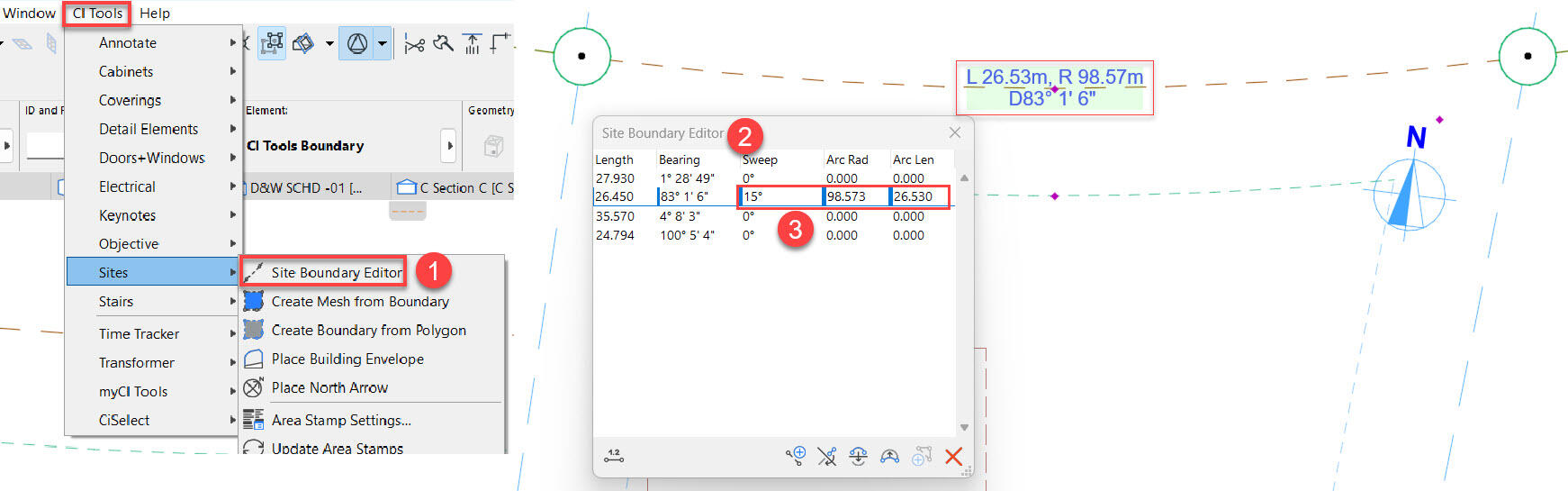
Ci Site Tool allows to create a Curved Boundary in the Site Boundary Editor – select a specific boundary that you need to modify, change the following parameters – Sweep < Arc Radius < Arc Length
Refer screenshot attached as an example for the quick steps.
___________________________________________________
For more settings refer to this knowledge base link with a workflow video –
https://cadimage.zendesk.com/hc/en-us/articles/8174847123471-CI-Sites-Tool-Creating-a-Curved-Boundary